 Lanes
LanesFor iPhone, iPad and Mac
See how your branches fit together.
01 The commit graph
History you can read at a glance.
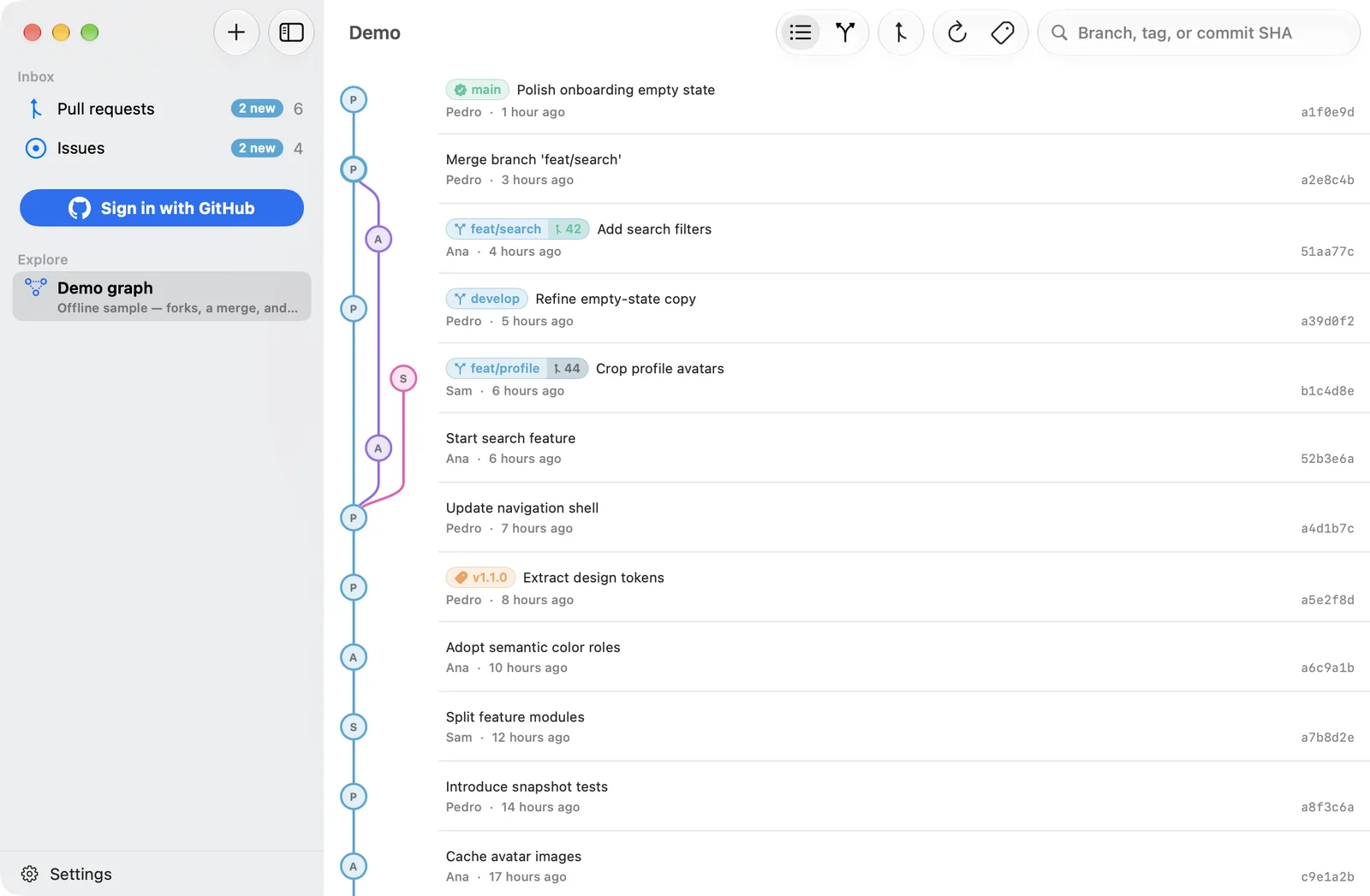
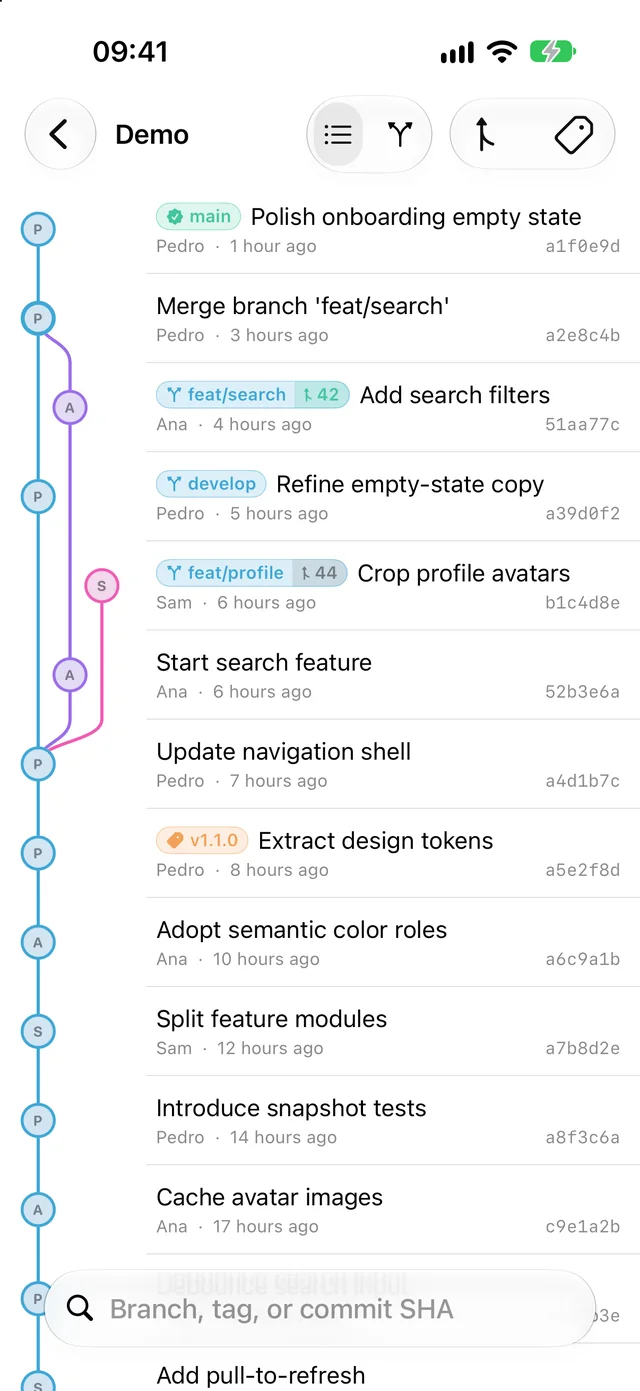
Every commit gets a lane, and forks and merges curve between them. Lanes loads the default branch and the 39 most recently active others, so the work in flight is what you see, even in repositories full of old branches.
Trace a commit's ancestry
Tap a commit to light up the trail it came from and dim everything else, with a row of chips naming the branches that contain it.
Commit details
Changed files with line counts, parent and child commits to walk through, and a link to the full diff on GitHub.
Search
Jump to a branch, a tag or a commit SHA. The graph scrolls to it and flashes the row.
Quick actions
Swipe a row to the left, or right-click it on the Mac, to open details, copy the SHA, tag the commit, or open it on GitHub.
Pull requests on the branch
A branch with a pull request shows its number on the chip, coloured by state: open, draft, merged or closed.
Author on every commit
Each commit in the graph shows its author's avatar, with initials when there's no picture.
02 Branches and tags
What branched from what, and when.
Switch from Commits to Branches and the commits fall away, leaving the shape of the work: each branch under the one it came from, in the order it happened.
A map on the big screen
On iPad and the Mac, branches are read left to right, with the default branch along the top and the days marked. On iPhone, they're the graph's lanes with the commits taken out.
Ahead and behind
Each branch shows ↑ the commits it has of its own and ↓ the ones its parent has gained since it forked.
Merged work, folded away
A merged branch runs back into the line it came from, marked “merged”. One toggle hides merged branches altogether, keeping any that unmerged work is stacked on.
Every tag, newest first
Browse a repository's tags and jump to any of them, even one past the history that's already loaded.
Create and push tags
Tag a commit from its row. Lanes checks the name as you type and suggests the next patch, minor and major version. New tags stay as drafts on your device until you push them.
03 Pull requests and issues
Everything you're part of, in one place.
Two inboxes gather every open pull request and issue you're involved in, across all your repositories, and show what happened since you last looked.
Yours, Reviewing, Mentioned
Pull requests are grouped by how you're involved. Filter by repository, hide drafts, and sort by last update or creation.
A timeline for each one
Review requests, reviews, pushes, CI results, mentions and assignments, in order. Back-to-back pushes fold into a single line.
Stacked PRs as stacks
When a pull request is based on another's branch, the whole chain is drawn on one rail down to the branch it lands on, including links you aren't part of.
Issues, with their projects
Issues assigned to you, created by you or mentioning you, with labels, milestone, comments, and their status on each GitHub Project they're in.
What's new since you looked
Anything GitHub notified you about gets a dot and a “new” count, its new events highlighted, and a place at the top of the inbox.
Keeps itself current
Each inbox refreshes every minute while it's on screen, and pauses in the background or when your GitHub quota runs low.
04 Everywhere you work
One app, sized to every screen.
The same Lanes on iPhone, iPad and Mac: a compact graph in your pocket, and a sidebar with room for the branch map on the bigger screens.
At home on the Mac
A sidebar and split view, a Settings window, keyboard shortcuts, right-click menus, and links that open in your default browser.
Fast to open, light on your quota
Repositories, inboxes and histories are cached, so they appear immediately and refresh in the background. Repeat requests to GitHub are conditional, so unchanged data doesn't count against your limit.
lanes://linksOpen a repository's graph, pull requests or issues straight from your notes, a terminal, or anywhere else a link can go.
Try it before signing in
An offline demo graph and demo inboxes show how everything works. Public repositories can be added by URL with no account at all.
Help built in
A short guide to every feature: Help ▸ Lanes Help on the Mac, and under Settings on iPhone and iPad.
What's not in the box
Just your history, and nothing else.
Not a git client.
Lanes doesn't clone, commit or push code. The only thing it ever writes to GitHub is a tag you choose to push.
No Lanes account.
Sign in with GitHub in your browser. You never type your password into Lanes, and the access token stays in your Keychain.
No tracking, no ads.
No analytics, no crash reporting, no third-party SDKs. The App Store privacy label reads Data Not Collected.
No server in the middle.
Lanes talks to GitHub directly. There's no Lanes backend to send anything to, and no “pro” tier waiting behind a paywall.
Requirements
iPhone, iPad and Mac
iOS 18, iPadOS 18 or macOS 15 or later.
A GitHub account, for your own repositories. Public repositories and the demo work without one.
Privacy
Nothing collected
Lanes talks to GitHub on your behalf, and that's all. Your token and cached data stay on your device, and signing out clears them.
Support
Get in touch
Questions, bugs or ideas: hello.plumaworks@gmail.com.
For how something works, Lanes Help inside the app covers every feature.